Technician Field Assistant (TFA)
Like having a senior tech with youon every call.
Lower service and parts costs across every OEM in your fleet.
TFA is an AI assistant that briefs your technicians before every call. They arrive knowing the likely cause, with the right parts checked against their carstock and the exact manual page a tap away. Fewer return visits. Fewer parts replaced on a guess. Senior‑level guidance for every tech.

Available on the web, iPhone, iPad and Android.


01 · Why it pays
Every return visit comes out of your margin.
Callbacks, hold-for-parts trips, parts replaced on a guess, and time spent searching all come out of the same place: the profit on your service contracts. TFA is built to go after all of them.
Lower service costs.
Fewer callbacks, fewer hold-for-parts trips, and less time on each call. Technicians arrive knowing the likely cause, what to check first, and whether the part is in their carstock.
Lower parts costs.
TFA shows which parts actually fixed this problem on this model, across the dealer community, so technicians replace what's broken, not what might be.
More profitable service.
Every avoided visit and every part you didn't need to replace stays in the contract's margin. Across a full team of technicians, that adds up month after month.
$138,000 a year
What a 25-technician dealer could save by moving from the median to top-20% callback and hold-for-parts rates, at about $100 a return visit. That counts return visits only, before any parts savings or time saved on each call.
Illustrative estimate based on Nexera dealer benchmarks. Not a guarantee or a measured TFA result.
And it works the same way, whatever OEM built the machine.
Next: Every OEM02 · Every OEM
One assistant for every OEM in your fleet.
Your fleet isn't one manufacturer, and your technicians' day isn't either. TFA brings the same guidance to every call, whatever the badge on the machine says, grounded in service history from across the dealer community.
OEM service tools
Cover one manufacturer's machines.
AI in your ERP or tech app
Sees only your own calls.
Generic AI chatbots
Not grounded in real repairs or your manuals.
TFA
Every OEM you service, grounded in service history from across the dealer community.
One tool across your whole fleet means one place for your technicians to look, and guidance that doesn't stop where one OEM's tools do.
70 million+
Real service calls from your dealer and across the dealer community. Every call is a real problem with a real technician solving it. TFA turns those real world fixes into actionable guidance for your technicians.
Nexera has studied dealer service data since 1993.
One dealer's history
A handful of matching events for this failure on this model.
Global service analytics
Patterns drawn from a far larger set of real service events.
Built on your service reality, not a generic model.
TFA is grounded in authorized service history, supported operational data, and relevant documentation. Through supported integrations, it can bring together dispatch details, call history, carstock context, and live device information without asking the technician to reconstruct the call. It is designed for the multi-manufacturer environments dealers support every day.
What it draws on
- Live ERP call context
- Dealer service history
- Nexera global service analytics
- OEM manuals and bulletins
- Technician carstock
- Device and DCA data
- Web sources
Built with your data, and your IT team, in mind.
Your data stays yours. Each dealer's service history and manuals stay private to that dealer. No dealer sees another dealer's data.
Personal details removed. Personal details are removed from call notes before AI processing, and global service analytics is anonymized.
Not used to train AI. TFA runs on a leading enterprise AI model under paid terms, and no model is trained on your data.
Private for technicians. A technician's conversations with the Assistant are private to them. Managers can't read them.
Ready for your IT review. Full documentation of the agent, data security, AI usage, and data governance is available on request.
Feature availability depends on supported integrations and manufacturer coverage.
That's the data. Here's how it reaches the technician.
Next: How it works03 · How it works
The answer is already in your data. It just isn't where the technician is.
The pieces live in different systems and with different people: dispatch, service history, device data, parts and carstock, documentation, technician experience, and the internet. None of it is pulled together for the call, so the technician is left searching, calling around, or working from a best guess.
- Callbacks
- The machine wasn't fully fixed on the first visit, so someone goes back.
- Hold for parts
- The technician arrives without the part they needed, and one visit becomes two.
- Parts replaced on a guess
- Without knowing what fixed this problem before, parts get swapped until the fault clears, and the dealer pays for every one.
- Knowledge loss
- Senior technicians have logged call notes for years, but those notes sit in a database where no one can use them at scale.
- New tech onboarding
- Training a new technician can take months of shadowing senior techs.
Every unnecessary truck roll costs fuel, labor, and the customer's downtime. Often the cause isn't the technician. It's missing information at the moment it mattered.
Context assembled before dispatch, and still there during the call.
TFA brings relevant service context together before dispatch and remains available while the technician diagnoses the call. Through supported integrations, it can automatically load the assigned technician, call notes, machine details, service history, and other available context when the call opens.
Likely causes, grounded in what actually worked
Likely causes informed by what resolved this failure on this model in real service history.
The parts that actually fixed it, checked against carstock
Recommended parts drawn from what resolved this failure on this model, cross-referenced with available carstock data.
Documentation matched to the machine
Relevant documentation matched to the machine and supported manufacturer coverage.
Live device data beside the service history
For dealers that also use MPS Monitor, supported live device data, such as panel messages, error codes, and supply levels, can be presented alongside historical service information.
Web sources
TFA searches for the most relevant public sources on the problem, reads them, and gives the key takeaways with links. It also finds relevant videos. For dealers on Nexera, this runs before the technician opens the call.
Where TFA runs
Web, iPhone, iPad and Android.
Available in English, Spanish, Portuguese, German, Italian and French, with regional versions for the US, UK, Latin America, Spain, Brazil and Portugal.
- Web browser
- iPhone and iPad
- Android
The same call context, in the technician's hand.
The native app is not a cut-down companion to the web application. What the service desk assembled before dispatch is what the technician opens in front of the machine, and the Assistant is there for the questions that only come up once the panel is off.
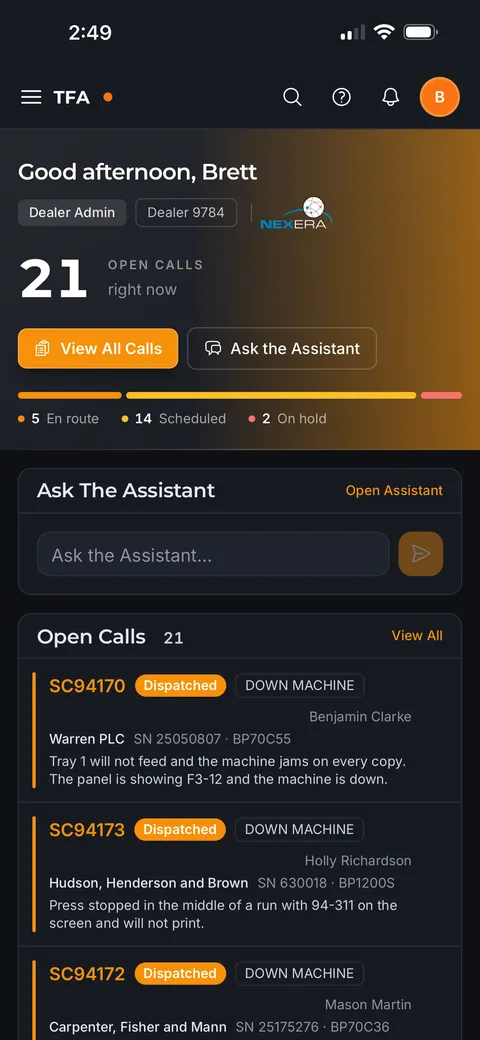
The day's calls, before the first drive
Open calls with the machine, the customer, and what was reported, plus how many are en route, scheduled, or on hold.
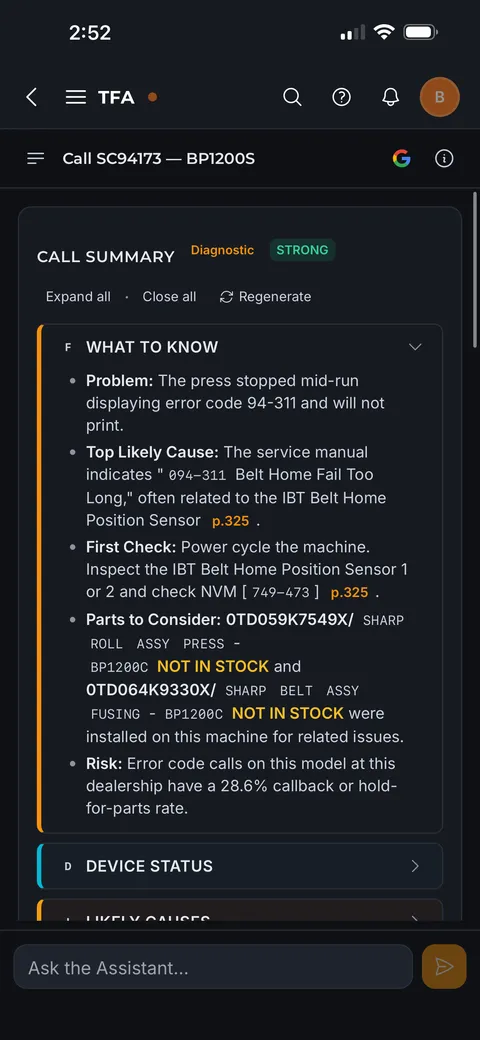
The call briefing, in one read
The quick take on everything worth knowing before arriving: the reported problem, the likeliest cause and what to check first, cited to the manual page, and the parts to consider, checked against carstock.
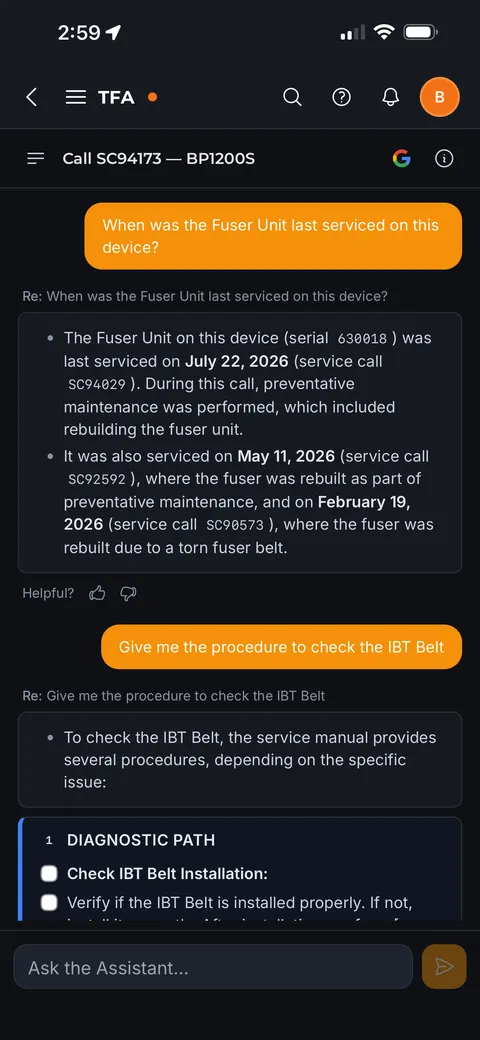
Ask about the machine in front of you
Answers drawn from this device's own service history and its service manual: when a part was last serviced and on which call, and the procedure to follow, step by step.
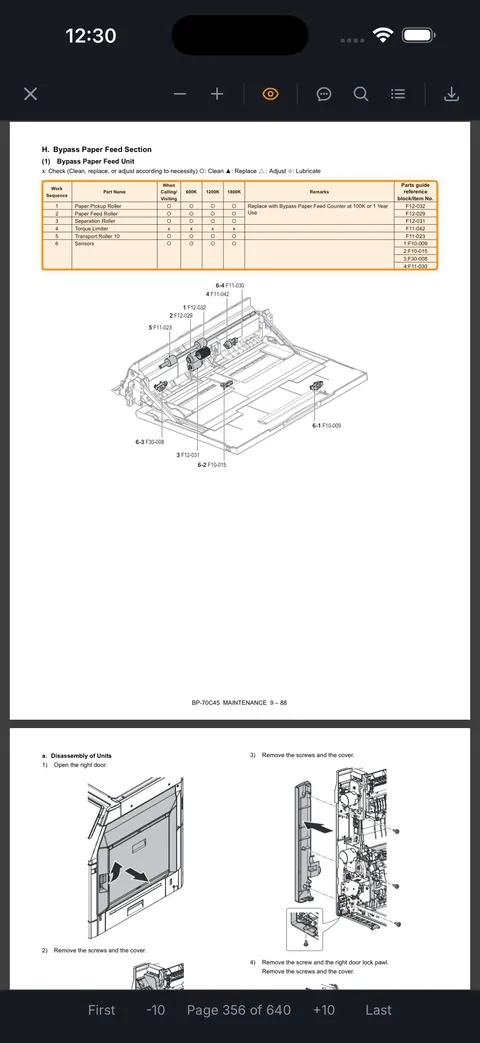
The manual page, not the manual
Documentation matched to the model and opened at the section for the job, rather than a 640-page PDF to scroll.
Get the app — on the App Store and Google Play.
Better-prepared technicians change the numbers your whole team is measured on.
Next: For your team04 · For your team
What it changes for your service operation.
It all starts with less time spent preparing. Call context loads automatically through supported integrations, and the briefing is ready before the technician asks.
Lower service costs
Fewer callbacks
Technicians arrive knowing the likely cause, what to check first, and what has fixed this problem before, so more calls are finished on the first visit.
From the field
Technicians say having the right context for the machine in front of them makes for a higher-quality call.
Lower service costs
Fewer hold-for-parts trips
Recommended parts are checked against carstock before the drive, so technicians can hold off on dispatching until they have the right parts.
From the field
Technicians report making smarter dispatch decisions by knowing which parts they need and which they already carry, avoiding unnecessary incompletes.
Lower service costs
Less time on each call
Answers cite the exact manual page and draw on real service history, so technicians spend less time searching and calling around, and more time fixing.
From the field
Technicians report that landing on the exact manual page, instead of scrolling the full PDF, is one of the most useful parts of TFA.
Lower parts costs
Better parts decisions
Technicians see which parts actually fixed this problem on this model, across the dealer community, before they order, so fewer parts get replaced on a guess.
From the field
In pilots, technicians have gone with a part TFA surfaced from real repair history instead of the usual replacement. It cost far less and still fixed the problem.
Protect what you've built
Knowledge becomes an asset
Your best technicians have been writing it down for years. TFA puts those call notes to work for the whole team, especially the next generation of techs, and that knowledge stays with your company when senior techs leave.
“Like having a senior technician on every dispatch.”
Service manager, imaging dealer Protect what you've built
Faster onboarding
Newer and out-of-territory technicians work with senior-level guidance from day one, so they can work on their own sooner.
From the field
One dealer service leader estimated a new tech could run basic calls in about a month with TFA, instead of riding along for about eight.
See your team. Close the gaps.
TFA is built for the technician, and service managers get everything a technician has, plus tools to run the team.
Your team's calls at a glance
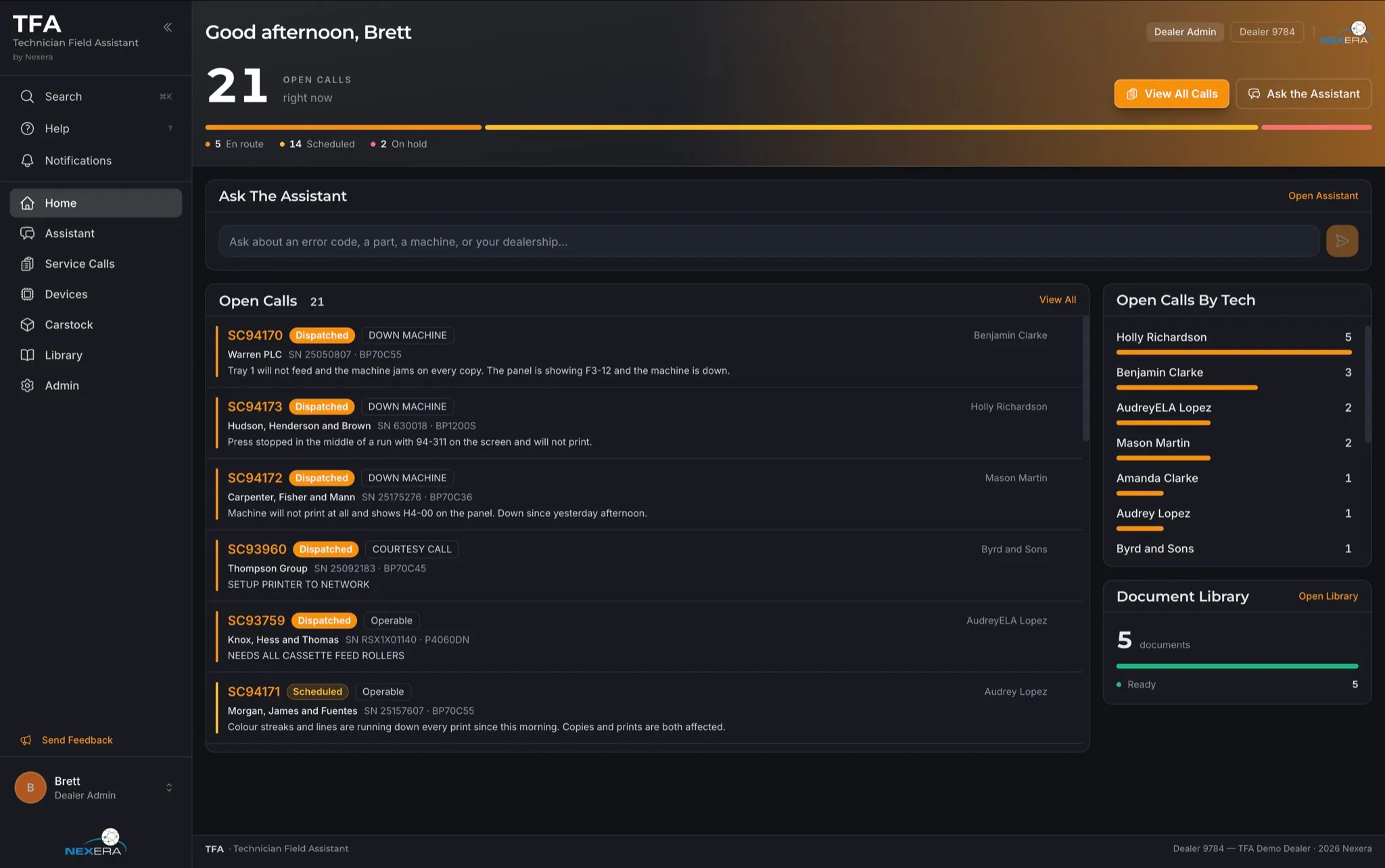
See open calls across the team, broken down by technician, in the same app your techs use.
A manual library that runs itself
Upload single files or whole manufacturer archives. TFA removes duplicates and matches each document to the models it covers, and you approve the matches.
Close the documentation gaps that cost the most
The coverage report shows which models in your fleet have no manuals, ranked by call volume.
Help desk, same briefing
Help desk technicians triage calls remotely with the same call briefing and Assistant, even with a customer on the phone.
TFA doesn't make the call. Your technician does.
Here's what closing the gap is worth.
Next: Proof05 · Proof
What a return visit really costs.
Every callback and hold-for-parts visit costs fuel, labor, and customer patience: roughly $100 a visit, before parts. Nexera benchmarks callback and hold-for-parts rates across the dealer community, so we can show where a typical dealer stands and what closing the gap is worth.
Median dealer
12.05% callbacks
10.24% hold-for-parts
The typical dealer across the dealer community
Top 20% of dealers
9.60% callbacks
6.94% hold-for-parts
80th percentile
Dealers are already performing at the 80th percentile, which makes it a realistic goal.
See the full benchmark table10th – 90th
| Percentile | Callback rate | Hold-for-parts rate |
|---|---|---|
| 10th | 16.43% | 16.95% |
| 20th | 14.69% | 14.70% |
| 30th | 13.54% | 13.11% |
| 40th | 12.62% | 11.59% |
| 50th | 12.05% | 10.24% |
| 60th | 11.40% | 9.07% |
| 70th | 10.68% | 8.09% |
| 80th | 9.60% | 6.94% |
| 90th | 8.17% | 5.09% |
What closing the gap is worth
If a dealer moved from the median to the 80th percentile on both rates, at about $100 a visit:
| Dealer size | Calls per month | Return visits avoided per month | Savings per month | Savings per year |
|---|---|---|---|---|
| Small (10 techs) | 800 | 46 | $4,600 | $55,200 |
| Medium (25 techs) | 2,000 | 115 | $11,500 | $138,000 |
| Large (60 techs) | 4,800 | 276 | $27,600 | $331,200 |
Assumes about 80 calls per technician per month.Illustrative estimate based on Nexera dealer benchmarks. Not a guarantee or a measured TFA result.
Try it with your numbers.
Not sure? Leave the median.
Not sure? Leave the median.
Fuel and labor, not parts.
- Return visits avoided per month
- 115
- Savings per month
- $11,500
- Savings per year
- $138,000
Your callback rate puts you around the 50th percentile.
Your hold-for-parts rate puts you around the 50th percentile.
This counts return visits only. Parts savings and time saved on each call aren't included.
Illustrative estimate based on Nexera dealer benchmarks. Not a guarantee or a measured TFA result.
See your numbers.
We'll compare your callback and hold-for-parts rates to the dealer community and show what closing the gap is worth for your team.
Or email us about a benchmark assessment: sales@nexera.net
In the field today.
In use with dealer service teams today, and shaped by feedback from working technicians.
“This is the best use of AI I have ever seen.”
“Seriously impressive.”
“I think you really have something here.”
“This is going to be so powerful.”
Built by Nexera and MPS Monitor.
TFA is the first product of Monitor to Manage, the strategy bringing Nexera and MPS Monitor together. It builds on Nexera's long-standing use of data from across the dealer community to solve what no single dealer can see alone, and brings that intelligence into real time, before and during every service call.
FAQ
Questions dealers ask.
What does it take to get started?
A TFA subscription with an e-automate connection, your list of users, and your manuals. On-premise e-automate connects with a short agent install. Cloud e-automate needs an access request to ECI, and setup time depends on your e-automate configuration. We'll walk you through it.
Which OEMs does TFA work with?
TFA is built for the multi-manufacturer fleets dealers service every day. Its call intelligence draws on service history from across the dealer community, across the manufacturers dealers support. Documentation matching works with the manuals you upload for any manufacturer, and live device data is available for supported devices on MPS Monitor. Feature availability depends on supported integrations and manufacturer coverage.
How is TFA different from my OEM's service tools?
OEM tools cover their own manufacturer's machines, often with deep brand-specific features, and your technicians can keep using them. TFA works across every OEM in your fleet, draws on more than 70 million real service calls from across the dealer community, and brings your own service history, carstock, and manuals into the same briefing. It's one place for your technicians to look, whatever the badge on the machine says.
We're on cloud e-automate, or a different ERP. Can we use TFA?
Cloud e-automate: yes, through an access request to ECI. Other ERPs: not today. Tell us which one you use.
How do technicians use it day to day?
They open the app and see their calls. They open a call and the call briefing is already there. They check parts against their carstock, then drive. On site, they ask the Assistant follow-up questions and tap citations to jump straight to the manual page they need.
Which devices does TFA run on?
Any web browser, iPhone and iPad (iOS 15 or later), and Android 7 or later. It's the same app everywhere, in English, Spanish, Portuguese, German, Italian and French.
Does it work offline?
TFA currently requires an internet connection.
What data do you access?
Your service calls and history, parts and carstock, technician and device records, the documents you upload, and MPS Monitor device data if you have it. Personal details are removed before AI processing, your data stays yours, and no AI model is trained on it. Full documentation of the agent, data security, AI usage, and data governance is available for your IT team on request.
How accurate is the AI, and what happens when it's wrong?
TFA is built to show its work:
- Answers from manuals cite the exact page.
- When TFA can't back up a claim, it marks the claim unverified.
- When an error code isn't in your manuals, TFA says so rather than guessing.
- It only says a part isn't in your carstock after checking the latest known levels.
- Most answers come from real, traceable data: your service history, global service analytics, and your manuals. When TFA has to rely on the AI model alone, the answer is clearly marked.
- Technicians can rate any answer, and every thumbs-down is reviewed against the exact sources used.
Can managers see what technicians ask?
No. Each technician's conversations with the Assistant are private.
Do you supply the manuals?
No. OEM manuals are confidential to each dealer, so you upload your own. TFA handles whole manufacturer archives and removes duplicates automatically.
How do we see TFA in action?
Request a demo at tfa.nexera.net or write to sales@nexera.net. We'll show your service management team how TFA works on calls like yours.
See what fewer return visits and smarter parts decisions are worth to your team.
See how TFA works on calls like yours. Request a demo and we'll walk your service team through it.